

For businesses with a team: everyone snaps, your accountant gets it all.
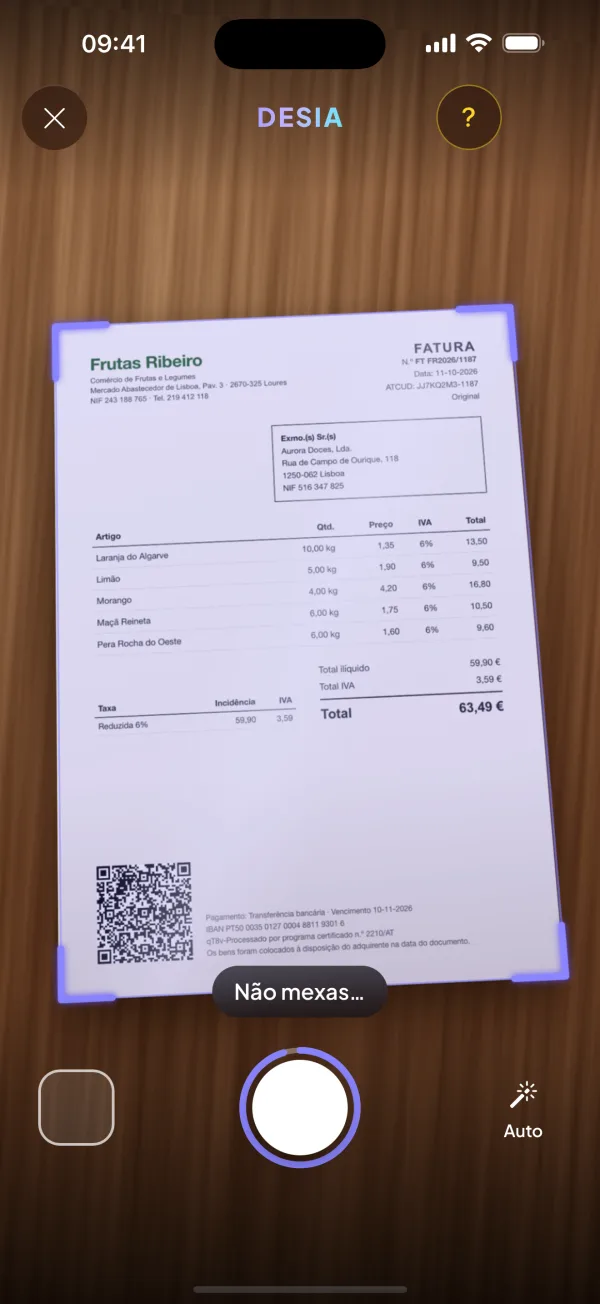
Point at the invoice.
It's saved.
Desia finds the corners of the invoice, straightens it, reads it and saves it — in seconds, without you typing a thing. At the end of the month, your accountant gets everything automatically.
- Invoices, till receipts and receipts
- Reads the tax QR code
- On the phone you already have

How it works
One gesture. Desia does the rest.
-
1
Point
Open the app and the camera is ready. The four corners lock onto the invoice — even on a white table, even with other papers around it. They hold for two seconds and it takes the photo automatically.
-
2
Check it at a glance
You see the invoice already straight and clean, with the corners on top. One is off? Drag it with your finger. If you don't touch anything, it saves automatically in five seconds.
-
3
Read and checked
The AI reads the supplier, the tax ID, the date, the VAT and the total — twice — and checks the sums. With the AT QR code, the numbers come from it. The ones that add up are saved automatically.
-
4
If it's not right, it tells you
A blurry photo, a faded receipt? Desia lets you know on your phone and asks for another photo, with one tap. No invoice gets forgotten.
Accountant
Your accountant gets everything. Automatically.
You choose the day and how often. Desia emails them a ZIP with one folder per month: every invoice as a PDF and the summary in Excel. If it's large, a secure link goes instead.
- Every month, every 3 months or every 6
- One PDF per invoice, with the date and amount in the name
- Excel with the expenses, the VAT and the suppliers
- Your accountant needs no account and no app
No more “I'm still missing March's invoices”.

Your month
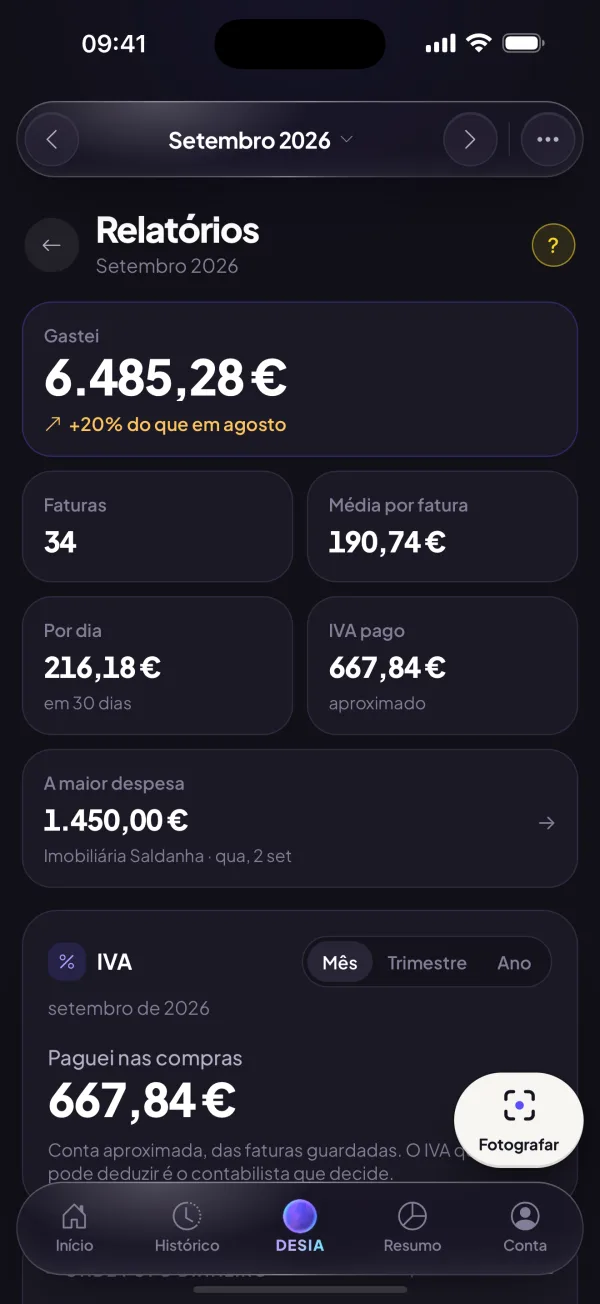
You know how much VAT you paid — before your accountant does.
How much you spent and how much of it was VAT, by month, quarter or year. Where the money went and which prices went up.
- The VAT you paid, rate by rate
- Where the money went, by category
- Prices that went up at your suppliers
DESIA · expenses + AI
Ask out loud. She answers.
Talk to Desia the way you talk to a person. And if you've just paid, say it — it's recorded.
Teams and companies
Your team snaps too.
- Everyone sees only their own. Employees snap the invoices they pay; you see them all.
- You know straight away. When someone on the team records an invoice, your phone tells you.
- Admins. Give whoever you like the power to see everything and invite people.
- Several companies. In the same account, each with its own accountant.
- 5 €/month per extra person. You only pay for the extra people you invite.

This month's invoices, in order.
70 €/month, everything included. Final price, no VAT on top. + 100 € joining fee, once.
Includes you and one more person; each extra person: 5 €/month.
Join DesiaCancel whenever you like. Your invoices are yours: download everything in a ZIP, even after cancelling.
Questions
How do I cancel?
In Account → Cancel the trial: it's two taps. If you cancel before the trial ends, you pay nothing. Once you've paid, you cancel in the same place and the plan lasts until the end of the paid month.
Which payment methods do you accept?
Credit or debit card, Apple Pay and Google Pay.
Where do the invoice photos go?
They're read by an artificial intelligence service (Groq, in the US) and stored in your account. Before the first reading we tell you which services they are and ask for your permission.
I already have e-Fatura. Why Desia?
e-Fatura shows the invoices that suppliers report to the AT with your tax ID. Desia also brings in till receipts, your team's expenses and invoices from abroad, reads them, organises them and sends it all to your accountant.
Does it work with paper receipts?
Yes: till receipts, A4 invoices, invoice-receipts and receipts. When there's an AT QR code, the numbers come from it, not from the reading.
What if the photo comes out badly?
The camera only takes the photo when the whole invoice is in frame and still. If it still isn't read properly, Desia tells you and you take another with one tap.
Does my accountant have to install anything?
No. They get an email with the ZIP (or a secure link, if it's large). No account needed.
Can I add the invoices I already have?
Yes: photos from your gallery and PDFs, many at once. A PDF with several invoices is split automatically.
Do I need a special phone?
No. It works in the browser of the phone you already have, Android or iPhone. On iPhone, add Desia to your Home Screen to get notifications.
Not here? Talk to us — we reply on the same working day.